เทคนิคการติดตั้งการ์ด 2 E1 PCI-E Slot บน Elastix

Elastix IP Pbx

Moderator: jubjang

เทคนิคการติดตั้งการ์ด 2 E1 PCI-E Slot บน Elastix

โพสต์โดย nuiz » 11 ต.ค. 2011 14:06

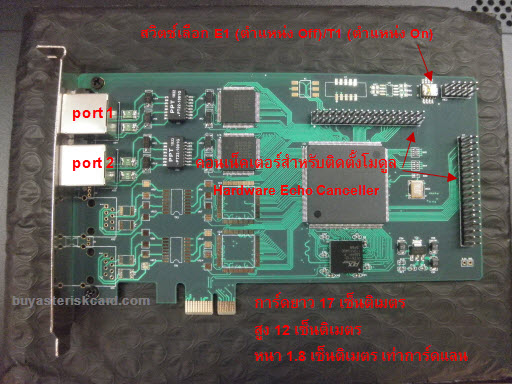
ผมจะแนะนำเทคนิคการติดตั้งและใช้งานการ์ด 2 E1, PCI-E บน Elastix ครับ โดยเป็น Elastix เวอร์ชั่น 2.0.3 แต่ก็สามารถนำวิธีการไปใช้กับ Elatix เวอร์ชั่นอื่นๆได้ การ์ด 2 E1 ที่ผมจะติดตั้งมีหน้าตาเป็นแบบนี้ครับ

รูปภาพ

วิธีการติดตั้งก็ไม่มีอะไรยุ่งยาก ตามขั้นตอนต่อไปนี้ครับ

1. ดาวน์โหลด E1 driver source code
เช็คเวอร์ชั่นของ CentOS ในเครื่องก่อนนะครับ ดีฟอลท์ของ Elastix 2.0.3 เป็น CentOS 5.5 แต่บางท่านอาจจะอัพเกรด (yum update) ให้เป็น CentOS 5.6 หรือไม่ก็ CentOS 5.7 แล้ว ผมมักจะใช้คำสั่ง cat /etc/redhat-release
โค้ด: เลือกทั้งหมด
cat /etc/redhat-release

ได้ผลออกมาเป็นแบบนี้
โค้ด: เลือกทั้งหมด
CentOS release 5.5 (Final)

แสดงว่าเครื่องผมเป็น CentOS 5.5

พอรู้เวอร์ชั่น CentOS แล้ว ก็ดาวน์โหลด E1 driver ให้ตรงกัน ตามลิ้งค์ต่อไปนี้ครับ

Driver Version 1.2.2 for CentOS 5.5
โค้ด: เลือกทั้งหมด
wget http://www.voip4share.com/sources/bluenet-linux-1.2.2.tar.bz2


Driver Version 1.2.2.1 for CentOS 5.6
โค้ด: เลือกทั้งหมด
wget http://www.voip4share.com/sources/bluenet-linux-1.2.2.1.tar.bz2


Driver Version: 1.2.3 for CentOS 5.7
โค้ด: เลือกทั้งหมด
wget http://www.voip4share.com/sources/bluenet-linux-1.2.3.tar.bz2


ดาวน์โหลดมาเก็บไว้ก่อน

2. เช็คเวอร์ชั่น Kernel
โค้ด: เลือกทั้งหมด
uname -r

ได้ว่า Kernel เวอร์ชั่น
2.6.18-194.3.1.el5

3. เช็คเวอร์ชั่น DAHDI
โค้ด: เลือกทั้งหมด
modinfo /lib/modules/2.6.18-194.3.1.el5/dahdi/dahdi.ko

ได้ว่า...
โค้ด: เลือกทั้งหมด
filename:       /lib/modules/2.6.18-194.3.1.el5/dahdi/dahdi.ko
version:        2.3.0.1
alias:          dahdi_dummy
license:        GPL v2
description:    DAHDI Telephony Interface
author:         Mark Spencer <markster@digium.com>
srcversion:     41F355C6A57FFC2BCFAE5FC
depends:        crc-ccitt
vermagic:       2.6.18-194.3.1.el5 SMP mod_unload 686 REGPARM 4KSTACKS gcc-4.1
parm:           debug:int
parm:           deftaps:int

ดูบรรทัด version ครับ แสดงว่าเป็น Dahdi เวอร์ชั่น 2.3.0.1

4. ดาวน์โหลด DAHDI และ OSLEC Source Code
ดาวน์โหลดซอร์สโค๊ด Dahdi เวอร์ชั่น 2.3.0.1
โค้ด: เลือกทั้งหมด
wget http://downloads.asterisk.org/pub/telephony/dahdi-linux-complete/releases/dahdi-linux-complete-2.3.0.1+2.3.0.tar.gz

ส่วน OSLEC เป็น Software Echo Canceller ครับ สุดยอดมากเลยตัวนี้ เราไม่ต้องเสียเงินซื้อ Hardware Echo Canceller แพงๆมาใส่ โหลดจากเว็บนี้ครับ
โค้ด: เลือกทั้งหมด
wget http://www.voip4share.com/sources/oslec-dahdi.tar.gz


5. แตกไฟล์ซอร์สโค๊ด E1 Driver, DAHDI และ OSLEC

โค้ด: เลือกทั้งหมด
tar xvf bluenet-linux-1.2.2.tar.bz2 -C /usr/src
tar xzvf dahdi-linux-complete-2.3.0.1+2.3.0.tar.gz -C /usr/src
tar xzvf oslec-dahdi.tar.gz -C /usr/src/dahdi-linux-complete-2.3.0.1+2.3.0/linux/drivers


แก้ไขไฟล์ Kbuild ของ Kernel นิดหน่อย ตามนี้ครับ
โค้ด: เลือกทั้งหมด
sed -i "s|#obj-m += dahdi_echocan_oslec.o|obj-m += dahdi_echocan_oslec.o|" /usr/src/dahdi-linux-complete-2.3.0.1+2.3.0/linux/drivers/dahdi/Kbuild
echo 'obj-m += echo.o' > /usr/src/dahdi-linux-complete-2.3.0.1+2.3.0/linux/drivers/staging/echo/Kbuild


6. คอมไพล์ซอร์สโค๊ด
6.1 คอมไพล์ซอร์สโค๊ด DAHDI พร้อม OSLEC
คอมไพล์ทับของเก่าไปเลยนะครับ ไม่ต้องกลัวว่าจะเจ้ง 55+ มันเป็นเวอร์ชั่นเดียวกัน เวลาติดตั้งก็ไปอยู่ในที่ๆเดียวกัน ของใหม่จะทับของเก่า
โค้ด: เลือกทั้งหมด
cd /usr/src/dahdi-linux-complete-2.3.0.1+2.3.0
make all
make install

6.2 คอมไพล์ไดร์เวอร์การ์ด E1
6.2.1 ใช้คำสั่ง configure
โค้ด: เลือกทั้งหมด
cd /usr/src/bluenet-linux-1.2.2
./configure --prefix=/usr --exec-prefix=/usr --bindir=/usr/bin --sbindir=/usr/sbin --sysconfdir=/etc --localstatedir=/var --with-dahdi=/usr/src/dahdi-linux-complete-2.3.0.1+2.3.0

จะได้ผลเป็นแบบนี้
โค้ด: เลือกทั้งหมด
checking for gcc... gcc
checking for C compiler default output file name... a.out
checking whether the C compiler works... yes
checking whether we are cross compiling... no
checking for suffix of executables...
checking for suffix of object files... o
checking whether we are using the GNU C compiler... yes
checking whether gcc accepts -g... yes
checking for gcc option to accept ANSI C... none needed
checking how to run the C preprocessor... gcc -E
checking for a BSD-compatible install... /usr/bin/install -c
checking whether ln -s works... yes
checking for grep... /bin/grep
checking for sh... /bin/sh
checking for ln... /bin/ln
checking for an ANSI C-conforming const... yes
checking for inline... inline
checking for egrep... grep -E
checking for ANSI C header files... yes
checking for sys/types.h... yes
checking for sys/stat.h... yes
checking for stdlib.h... yes
checking for string.h... yes
checking for memory.h... yes
checking for strings.h... yes
checking for inttypes.h... yes
checking for stdint.h... yes
checking for unistd.h... yes
checking for off_t... yes
checking for pid_t... yes
checking for size_t... yes
checking whether time.h and sys/time.h may both be included... yes
checking for working volatile... yes
checking for ANSI C header files... (cached) yes
checking for memset... yes
checking for kernel version... 2.6.18-194.3.1.el5
checking for kernel source... /lib/modules/2.6.18-194.3.1.el5/build
checking for dahdi in /usr/src/dahdi-linux-complete-2.3.0.1+2.3.0... yes
configure: creating ./config.status
config.status: creating makeopts
config.status: creating drivers/Kbuild


6.2.2 คอมไพล์
รันคำสั่งนี้
โค้ด: เลือกทั้งหมด
make

ระหว่างคอมไพล์ถ้าเห็นข้อความเตือนแบบนี้
โค้ด: เลือกทั้งหมด
        echo;                                                           \
        echo "  ERROR: Kernel configuration is invalid.";               \
        echo "         include/linux/autoconf.h or include/config/auto.conf are missing.";      \
        echo "         Run 'make oldconfig && make prepare' on kernel src to fix it.";  \
        echo;                                                           \
        /bin/false)

หรือแบบนี้
โค้ด: เลือกทั้งหมด
WARNING: "dahdi_lboname" [/usr/src/bluenet-linux-1.2.2/drivers/t4xxp/t4xxp.ko] undefined!
WARNING: "dahdi_rbsbits" [/usr/src/bluenet-linux-1.2.2/drivers/t4xxp/t4xxp.ko] undefined!
WARNING: "dahdi_ec_chunk" [/usr/src/bluenet-linux-1.2.2/drivers/t4xxp/t4xxp.ko] undefined!
WARNING: "dahdi_hdlc_finish" [/usr/src/bluenet-linux-1.2.2/drivers/t4xxp/t4xxp.ko] undefined!
WARNING: "dahdi_unregister" [/usr/src/bluenet-linux-1.2.2/drivers/t4xxp/t4xxp.ko] undefined!
WARNING: "dahdi_ec_span" [/usr/src/bluenet-linux-1.2.2/drivers/t4xxp/t4xxp.ko] undefined!
WARNING: "dahdi_receive" [/usr/src/bluenet-linux-1.2.2/drivers/t4xxp/t4xxp.ko] undefined!
WARNING: "dahdi_hdlc_abort" [/usr/src/bluenet-linux-1.2.2/drivers/t4xxp/t4xxp.ko] undefined!
WARNING: "dahdi_qevent_lock" [/usr/src/bluenet-linux-1.2.2/drivers/t4xxp/t4xxp.ko] undefined!
WARNING: "dahdi_register" [/usr/src/bluenet-linux-1.2.2/drivers/t4xxp/t4xxp.ko] undefined!
WARNING: "dahdi_transmit" [/usr/src/bluenet-linux-1.2.2/drivers/t4xxp/t4xxp.ko] undefined!
WARNING: "dahdi_hdlc_getbuf" [/usr/src/bluenet-linux-1.2.2/drivers/t4xxp/t4xxp.ko] undefined!
WARNING: "dahdi_alarm_notify" [/usr/src/bluenet-linux-1.2.2/drivers/t4xxp/t4xxp.ko] undefined!
WARNING: "dahdi_hdlc_putbuf" [/usr/src/bluenet-linux-1.2.2/drivers/t4xxp/t4xxp.ko] undefined!
WARNING: "dahdi_register" [/usr/src/bluenet-linux-1.2.2/drivers/bl1600a.ko] undefined!
WARNING: "dahdi_transmit" [/usr/src/bluenet-linux-1.2.2/drivers/bl1600a.ko] undefined!
WARNING: "dahdi_receive" [/usr/src/bluenet-linux-1.2.2/drivers/bl1600a.ko] undefined!
WARNING: "dahdi_ec_chunk" [/usr/src/bluenet-linux-1.2.2/drivers/bl1600a.ko] undefined!
WARNING: "dahdi_qevent_lock" [/usr/src/bluenet-linux-1.2.2/drivers/bl1600a.ko] undefined!
WARNING: "dahdi_alarm_channel" [/usr/src/bluenet-linux-1.2.2/drivers/bl1600a.ko] undefined!
WARNING: "dahdi_hooksig" [/usr/src/bluenet-linux-1.2.2/drivers/bl1600a.ko] undefined!
WARNING: "dahdi_unregister" [/usr/src/bluenet-linux-1.2.2/drivers/bl1600a.ko] undefined!

ก็ไม่ต้องสนใจครับ ให้ติดตั้งได้เลย รันคำสั่งนี้ (แต่ถ้าข้อความ Error มันไม่ใช่แบบที่ผมโพสต์ไว้ก็แสดงว่าเป็นปัญหาอย่างอื่นนะครับ ไว้มาดูกันอีกที ถ้าไม่มี Error อย่างอื่นก็ติดตั้งต่อได้เลย)
โค้ด: เลือกทั้งหมด
make install

เจอข้อความ Error แบบข้างบนอีกก็ไม่ต้องสนใจครับ แต่ถ้าข้อความ Error มันไม่ใช่แบบที่ผมโพสต์ไว้ก็แสดงว่าเป็นปัญหาอย่างอื่นนะครับ ไว้มาดูกันอีกที ถ้าไม่มี Error อย่างอื่นอีกก็เป็นอันว่าติดตั้งสำเร็จครับ

6.2.3 เช็คในไฟล์ /etc/dahdi/genconf_parameters
เพิ่มบรรทัดนี้เข้าไปนะครับ ถ้าเช็คแล้วยังไม่มี
โค้ด: เลือกทั้งหมด
context_lines from-pstn
echo_can oslec


6.2.4 เช็คดูในไฟล์ /etc/dahdi/modules
จะเห็นมี 2 บรรทัดต่อไปนี้เพิ่มขึ้นมา
โค้ด: เลือกทั้งหมด
t4xxp
bl1600a


6.2.5 รีสตาร์ทเครื่อง
โค้ด: เลือกทั้งหมด
reboot

** เน้นว่าติดตั้งเสร็จแล้ว ต้องรีบู๊ตเครื่องก่อนเลยนะครับ **

7. สร้างไฟล์คอนฟิกของการ์ด E1
พิมพ์คำสั่งนี้
โค้ด: เลือกทั้งหมด
dahdi_genconf


เช็คไฟล์ /etc/dahdi/system.conf จะมีข้อมูลแบบนี้
โค้ด: เลือกทั้งหมด
# Span 1: TE4/0/1 "T4XXP (PCI) Card 0 Span 1" (MASTER)
span=1,1,0,ccs,hdb3,crc4
# termtype: te
bchan=1-15,17-31
dchan=16
echocanceller=oslec,1-15,17-31

# Span 2: TE4/0/2 "T4XXP (PCI) Card 0 Span 2"
span=2,2,0,ccs,hdb3,crc4
# termtype: te
bchan=32-46,48-62
dchan=47
echocanceller=oslec,32-46,48-62


และที่ไฟล์ /etc/asterisk/dahdi-channels.conf จะมีข้อมูลแบบนี้
โค้ด: เลือกทั้งหมด
; Span 1: TE4/0/1 "T4XXP (PCI) Card 0 Span 1" (MASTER)
group=0,11
context=from-pstn
switchtype = euroisdn
signalling = pri_cpe
channel => 1-15,17-31
context = default
group = 63

; Span 2: TE4/0/2 "T4XXP (PCI) Card 0 Span 2"
group=0,12
context=from-pstn
switchtype = euroisdn
signalling = pri_cpe
channel => 32-46,48-62
context = default
group = 63


รีสตาร์ทเครื่องอีกครั้ง
โค้ด: เลือกทั้งหมด
reboot


ไฟด้านหลังการ์ดก็จะติด พร้อมคอนฟิกใช้งานครับ

8. เช็คจากหน้าเว็บ Hardware Detector ของ Elastix

หน้าเว็บ Hardware Detector จะโชว์เป็นแบบนี้ครับ "ไม่ต้องกดปุ่ม Detect New Hardware นะครับ" พอร์ต E1 แรกผมต่อกับตู้ PABX ก็เลยเห็นเป็นสีเขียว ไฟด้านหลังการ์ดก็เป็นสีเขียว ส่วนพอร์ตที่ 2 ยังไม่ได้ต่อ หลอดไฟด้านหลังการ์ดจะเป็นสีแดง

รูปภาพ

ก็เป็นอันว่าติดตั้งการ์ด 2 E1 นี้บน Elastix ผ่านไปด้วยดี ต่อไปก็คอนฟิกใช้งาน

9.คอนฟิกการ์ด 2 E1 บน Elastix
ขั้นตอนการคอนฟิกใช้งานพอร์ต E1 ก็ทำเหมือนกับคอนฟิกการ์ดประเภทอื่นๆของ Asterisk ครับ ได้แก่ คอนฟิก DAHDI Trunks, Outbound Routes, ZAP Channel DIDs, Inbound Routes
ดูตัวอย่างได้จากบทความต่อไปนี้ครับ
เทคนิคการใช้งานการ์ด 1 E1
เทคนิคการใช้งานการ์ด 4 E1

10. ถ้าต้องการถอนการติดตั้ง ไม่ยากครับ ทำดังนี้
โค้ด: เลือกทั้งหมด
cd /usr/src/bluenet-linux-1.2.2
make uninstall

จะมีข้อความขึ้นแบบนี้
โค้ด: เลือกทั้งหมด
checking for gcc... gcc
checking for C compiler default output file name... a.out
checking whether the C compiler works... yes
checking whether we are cross compiling... no
checking for suffix of executables...
checking for suffix of object files... o
checking whether we are using the GNU C compiler... yes
checking whether gcc accepts -g... yes
checking for gcc option to accept ANSI C... none needed
checking how to run the C preprocessor... gcc -E
checking for a BSD-compatible install... /usr/bin/install -c
checking whether ln -s works... yes
checking for grep... /bin/grep
checking for sh... /bin/sh
checking for ln... /bin/ln
checking for an ANSI C-conforming const... yes
checking for inline... inline
checking for egrep... grep -E
checking for ANSI C header files... yes
checking for sys/types.h... yes
checking for sys/stat.h... yes
checking for stdlib.h... yes
checking for string.h... yes
checking for memory.h... yes
checking for strings.h... yes
checking for inttypes.h... yes
checking for stdint.h... yes
checking for unistd.h... yes
checking for off_t... yes
checking for pid_t... yes
checking for size_t... yes
checking whether time.h and sys/time.h may both be included... yes
checking for working volatile... yes
checking for ANSI C header files... (cached) yes
checking for memset... yes
checking for kernel version... 2.6.18-194.3.1.el5
checking for kernel source... /lib/modules/2.6.18-194.3.1.el5/build
checking for dahdi version... 2.3.0.1
checking for dahdi in /usr/src/bluenet-linux-1.2.2/dl/dahdi-linux-2.3.0.1... yes
configure: creating ./config.status
config.status: creating makeopts
config.status: creating drivers/Kbuild
make[1]: Entering directory `/usr/src/bluenet-linux-1.2.2'
make -C /lib/modules/2.6.18-194.3.1.el5/build V=1 SUBDIRS=/usr/src/bluenet-linux-1.2.2/drivers HOTPLUG_FIRMWARE=yes clean
make[2]: Entering directory `/usr/src/kernels/2.6.18-194.3.1.el5-i686'
make -f scripts/Makefile.clean obj=/usr/src/bluenet-linux-1.2.2/drivers
make -f scripts/Makefile.clean obj=/usr/src/bluenet-linux-1.2.2/drivers/t4xxp
  rm -rf /usr/src/bluenet-linux-1.2.2/drivers/.tmp_versions
make[2]: Leaving directory `/usr/src/kernels/2.6.18-194.3.1.el5-i686'
make -C drivers/firmware clean
make[2]: Entering directory `/usr/src/bluenet-linux-1.2.2/drivers/firmware'
rm -f dahdi-fw-*.o
make[2]: Leaving directory `/usr/src/bluenet-linux-1.2.2/drivers/firmware'
make[1]: Leaving directory `/usr/src/bluenet-linux-1.2.2'
rm -rf /lib/modules/2.6.18-194.3.1.el5/bluenet
[ `id -u` = 0 ] && /sbin/depmod -a 2.6.18-194.3.1.el5 || :

รีบู๊ตเครื่อง
โค้ด: เลือกทั้งหมด
reboot

ลบข้อมูลในไฟล์คอนฟิก /etc/dahdi/system.conf และ /etc/sysconfig/dahdi-channels.conf
โค้ด: เลือกทั้งหมด
dahd_genconf


ขอขอบคุณเว็บไซต์ http://www.buyasteriskcard.com ที่เอื้อเฟื้ออุปกรณ์ให้ทดสอบ
ขอบคุณสำหรับทุกคำถามและทุกคำตอบครับ
nuiz
Diamond Member
 
โพสต์: 1675
ลงทะเบียนเมื่อ: 24 มี.ค. 2010 09:33

ย้อนกลับไปยัง Elastix - Unified Communications Software

ผู้ใช้งานขณะนี้

่กำลังดูบอร์ดนี้: ไม่มีสมาชิกใหม่ และ บุคคลทั่วไป 1 ท่าน